Who it covers
One school: cross country and track, every coach on staff, and adult-managed Parent Access for every roster household through the active program code.
Loading…
For coaches and programs
Program Access gives your staff three 12-week season playbooks and a dietitian to ask when the week changes. Every roster household gets private Parent Access through the school code; coaches never see household body data.
$250/year per school. No per-athlete or per-coach fee.
School or district paying by invoice or purchase order? Start the paperwork here.
What your first week looks like
Your staff reviews and sends everything through its own school channel. Aspire never sends to families for you.
Program Access at a glance
Aspire Program Access is a schoolwide sports-nutrition system for high school cross country and track, built and supported by Luke Rodriguez, MS, RDN, a high school distance coach.
One school: cross country and track, every coach on staff, and adult-managed Parent Access for every roster household through the active program code.
This actual week
Free · week 4
Lock in one last-bell snack and one shelf-stable backup before meets stack up. Reviewed, printable, free — with a line to paste to families.
Get this week's free sheetProgram Access · week 4
This week's family email — “The team snack bin, and how to contribute” — is ready to review, with the practice talk and staff checklist beside it. Send it through your school channel and move on. All 12 weeks, three season tracks.
Get the written weeks — $250What is included
One school license, once a year. There is no per-athlete fee. Roster households activate included Parent Access with your active program code.
Who it covers
Every coach on your staff, cross country and track.
Who else gets in
An adult in every roster household uses your program code for a private Parent Access account at no extra charge.
What you can ask
General education and implementation questions about the materials in your Aspire workspace.
How fast you hear back
Within 2 business days, from a registered dietitian who coaches this sport.
What you can use
Three 12-week playbooks, the 70-recipe Household Kitchen for roster families, 4 reviewed articles, 71 print-ready handouts, and the current team tools.
Coach course
The eight-module Aspire Nutrition Coach course, with a module check after each lesson, a scenario final exam, and a verifiable certificate, for every coach on staff.
What stays private
Mobile app launching
Use the secure web workspace now from a phone or laptop. Coach and household information stays in separate views.
Coach view
The weekly plan, parent email, team talk, handout, staff steps, and program code.
Household view
The 70-recipe Kitchen, private grocery list, practical guides, saved resources, and account support.
Coaches never see household runner height, weight, or other private profile data.
Accounts are for adults age 18 or older. Minor runners use Aspire only through an adult-managed household account; there is no child-owned signup. Program Access and Parent Access are available to schools and adult-managed households across the United States.
The secure web workspace works now on a phone or laptop. The mobile app is still completing store release, so we do not present it as downloadable yet.
Dietitian support
A parent asks what to pack for an away meet. Your snack-access plan falls apart. You are not sure whether the next step belongs with the family, athletic trainer, physician, or dietitian. Send the general program question and hear back within 2 business days.
Email general education and implementation questions to Aspire; a registered dietitian responds within 2 business days. Email is not monitored for emergencies, and individual athlete assessment and treatment require 1:1 care.
If a family wants 1:1 care
Families at a participating school pay a reduced rate for individualized athlete support. Individual care remains separate from Program Access.
Built from a real school week
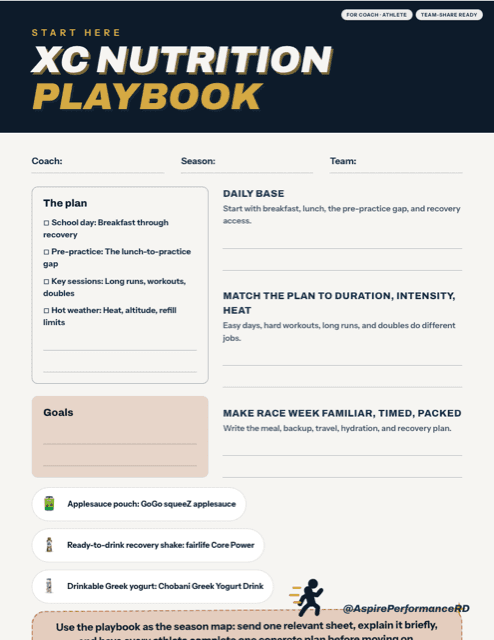
Program Access was built from Luke Rodriguez's weekly workflow as head XC coach: one parent email, one 2-minute team talk, and one matching handout or tool during a real school week.
01
Review the message, make it sound like your program, and send it through your school channel.
02
Read the matching practice talk while the topic is useful, not three weeks later.
03
Print the sheet or open the staff tool that finishes the same weekly handoff.
If the school is not buying this season
You can share the Parent Access page without purchasing anything. A household without a team code can choose $29 once for 120 days. Families with an active program code already have access and should not buy it again.
Open the week, review the parent message, send it through your school channel, give the two-minute team talk, and share the matching resource. Families join privately with your program code; Aspire never messages families for you.
within 2 business days
Coaches never see household runner height, weight, or other private profile data.
Individualized assessment, diagnosis, and 1:1 treatment are separate from Program Access.
A live season-kickoff team or parent talk is an optional $200 Program Access add-on.
Coaches never see household runner height, weight, or other private profile data.
What is separate
Individual assessment, testing, treatment, supplements, clearance, and 1:1 planning are not part of Program Access.